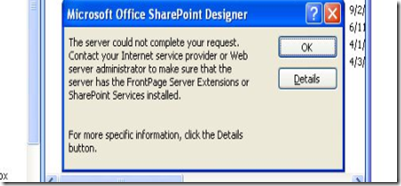

The error that you encounter often shows up when we try to open the file in Read-only mode without checking it out. Such errors are usually associated with incorrect master-page associations. In order to sort this out either correct the errors in the associated master-page or check-out the file and then try to open it.
Remember this could be one of the reasons of such errors and provided above is only a workaround.
Showing posts with label check out. Show all posts
Showing posts with label check out. Show all posts
Wednesday, June 3, 2009
'Server could not complete your request' ; 'soap: Serverserver was unable to process request' while opening a page in SharePoint designer
.
Wednesday, June 3, 2009
0
comments


'Object reference not set to an instance of an object' error for site collection admin
Labels: check out, error, master page, sharepointLast night I received an issue wherein a site collection admin was getting the below error only on the home page of her site. We tried with all WFEs and even with a test user account but could not replicate the issue.

How I resolved it: -
Since she was a site collection admin, it was safe to give her full control anywhere. The home page was a publishing page that uses masterpages and page layouts. So I went to the master page gallery and provided her full control and bingo it worked ! Next day she again received the same error. One of our team member went into the checked out files section and took ownership of all her files. And shoot, this time he was able to replicate the issue. we did a simple Binary search and were able to find out the culprit file and took it our of the library. Next thing, client regained her access. :)
Error while checking out a file - "file does not appear to be checked out"
Labels: check out, error, sharepointIf ever we see a situation where an implicit lock is active, going to “Edit Properties” on the document (which requires checkout) is the only way I know to get the actual NAME of the person with the implicit lock.
Now if the user comes back and says she has closed Excel we still need to check because Excel and Outlook might be in a zombie state (running in Task Manager Process tab, but without having any visible windows on the desktop) In these rare cases the lurking EXE may still have the SharePoint file open over the network. So even though the end user swears she is no longer editing the file, the Windows client may still have the fill open and would be continually refreshing, thus maintaining the implicit lock. Sometimes we may need to have the end user reboot to release the zombie held lock.
NOTE:: The lock can be removed only by that user and only through the system used to place the lock.
Subscribe to:
Posts (Atom)


